Speed Distance Time Calculator2.5.4
Publisher Description

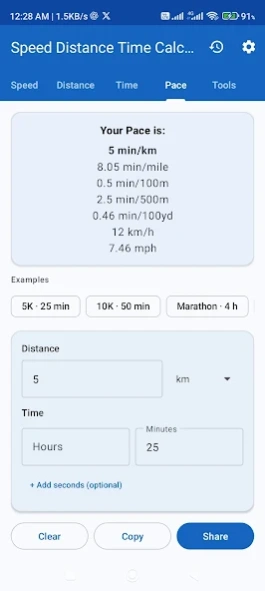


Speed, distance, time & pace calculator with trip tools and unit converter
Speed Distance Time Calculator is a fast, accurate app for solving speed, distance, and time problems — plus pace for runners, swimmers, and rowers, and handy tools for everyday travel.
Enter any two values and get the third instantly. Results update as you type. No login required. Core calculations work offline.
✨ MAIN CALCULATORS
🔢 Speed — distance + time → speed
📏 Distance — speed + time → distance
⏱️ Time — speed + distance → travel time
🏃 Pace — distance + time → min/km, min/mile, min/100m, min/500m, min/100yd, and speed
✨ BUILT-IN TOOLS
🗺️ Trip planner — ETA from depart time, or required speed to arrive by a deadline
⛽ Fuel cost — estimate fuel needed and total cost from efficiency and price
📊 Average speed — combine multiple legs into one average
🔄 Unit converter — convert speed, distance, and duration units (km ↔ miles, km/h ↔ mph, hours ↔ minutes, and more)
✨ SMART FEATURES
⚡ Live results as you type
📋 Example presets — 5K, marathon, highway trips, and more (one tap to try)
🧭 Many units — km, miles, meters, yards, feet, knots, and optional advanced units (Mach, light year, etc.)
🌙 Light, dark, and system theme
⚙️ Settings — decimal precision, default units, calculation history & favorites
📤 Copy and share results on every tab
📱 Clean Material Design UI; optimized for phones and tablets
🚫 Optional Remove Ads (one-time purchase)
🎯 PERFECT FOR
• Students solving physics and motion problems
• Runners, cyclists, and swimmers tracking pace
• Drivers and travelers estimating ETA or trip time
• Anyone converting between km/miles, km/h/mph, or time units
Pick two values — or use a preset — and get clear, accurate answers in seconds.
Questions or suggestions? divinityinception@gmail.com
About Speed Distance Time Calculator
The company that develops Speed Distance Time Calculator is Divinity Inception. The latest version released by its developer is 2.5.4.
To install Speed Distance Time Calculator on your Android device, just click the green Continue To App button above to start the installation process. The app is listed on our website since 2026-07-26 and was downloaded 1 times. We have already checked if the download link is safe, however for your own protection we recommend that you scan the downloaded app with your antivirus. Your antivirus may detect the Speed Distance Time Calculator as malware as malware if the download link to com.divinityinception.speeddistancetimecalculator is broken.
How to install Speed Distance Time Calculator on your Android device:
- Click on the Continue To App button on our website. This will redirect you to Google Play.
- Once the Speed Distance Time Calculator is shown in the Google Play listing of your Android device, you can start its download and installation. Tap on the Install button located below the search bar and to the right of the app icon.
- A pop-up window with the permissions required by Speed Distance Time Calculator will be shown. Click on Accept to continue the process.
- Speed Distance Time Calculator will be downloaded onto your device, displaying a progress. Once the download completes, the installation will start and you'll get a notification after the installation is finished.
Program Details
System requirements
Download information
Pricing
Version History
version 2.5.4
posted on 2026-07-26
Version 2.5.4
• Updated for Android 16 (Google Play requirement)
• Improved in-app purchase support (Remove Ads) with the latest Play Billing library
• Compact result bar while typing (optional in Settings)
• Show primary answer or all units in the sticky bar
• Settings polish — version display and navigation bar fix
• Keyboard no longer covers inputs
• Time input modes: hours/min, +seconds, or +milliseconds
• Pace units, yards, presets, and unit converter (Tools)
version 2.5.3
posted on 2026-06-30
Version 2.5.3
• Keyboard issue fixed
• Compact result bar while typing (optional in Settings)
• Show primary answer or all units in the sticky bar
• Settings polish — version display and navigation bar fix
• Keyboard no longer covers inputs
• Time input modes: hours/min, +seconds, or +milliseconds
• Pace units, yards, presets, and unit converter (Tools)
version 2.5.2
posted on 2026-06-25
• Compact result bar while typing (optional in Settings)
• Show primary answer or all units in the sticky bar
• Settings polish — version display and navigation bar fix
• Keyboard no longer covers inputs
• Time input modes: hours/min, +seconds, or +milliseconds
• Pace units, yards, presets, and unit converter (Tools)
version 1.7
posted on 2025-05-03
+ More units included
Our Best
--------------
* Please check permission. Always no unwanted permission
* Very simple design
version 1.6.1
posted on 2019-08-08
+ Seconds included.
Our Best
--------------
* Please check permission. Always no unwanted permission
* Very simple design
* Light weight
version 1.6.1
posted on 2019-08-08
+ Seconds included.
